

HTML and CSS can describe a page, but neither can make a decision or do a calculation. That is the job of JavaScript. JavaScript basics are a handful of ideas found in almost every programming language: storing values, comparing them, repeating steps and grouping steps into functions.
This guide covers the core language only. Every example prints its result to the console, so you can focus on the logic. Working with page elements comes later in the series.
Table of Contents
What JavaScript Is
JavaScript is a programming language that runs in every modern browser. Despite the name, it is not related to Java.
A JavaScript file is a list of instructions. The browser reads them from top to bottom and carries them out one at a time.
How to Add a Script and Use the Console
Save your code in a file such as script.js, then link it from your HTML page just before the closing </body> tag:
html
<script src="script.js"></script>Put this line in script.js:
console.log("Hello from JavaScript");console.log() prints a message to the browser console. To open the console, press F12 (or right-click the page and choose Inspect), then select the Console tab. You can also type JavaScript straight into the console to try things out.
JavaScript Basics: Variables and Data Types
A variable is a named container for a value.
let score = 10;
score = 15; // let allows a new value

const playerName = "Maya"; // const cannot be reassigned
console.log(playerName, score); // Maya 15
Use const by default and let when the value needs to change. Text after // is a comment that JavaScript ignores.
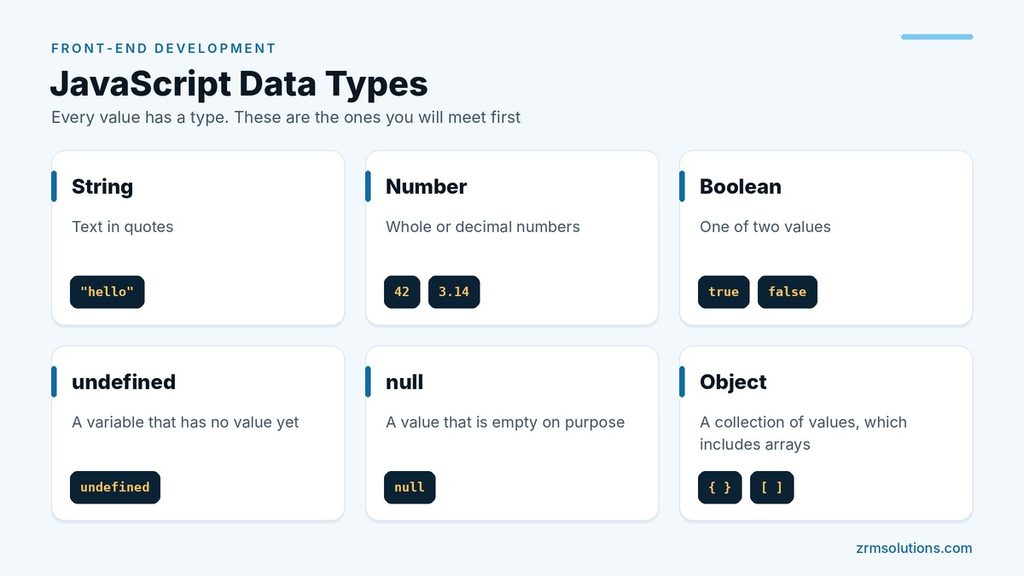
Every value has a type. The ones you will meet first are:
- String: text in quotes, such as
"hello" - Number:
42or3.14 - Boolean:
trueorfalse - undefined: a variable that has no value yet
- null: a value that is empty on purpose
- Object: a collection of values, which includes arrays
Operators
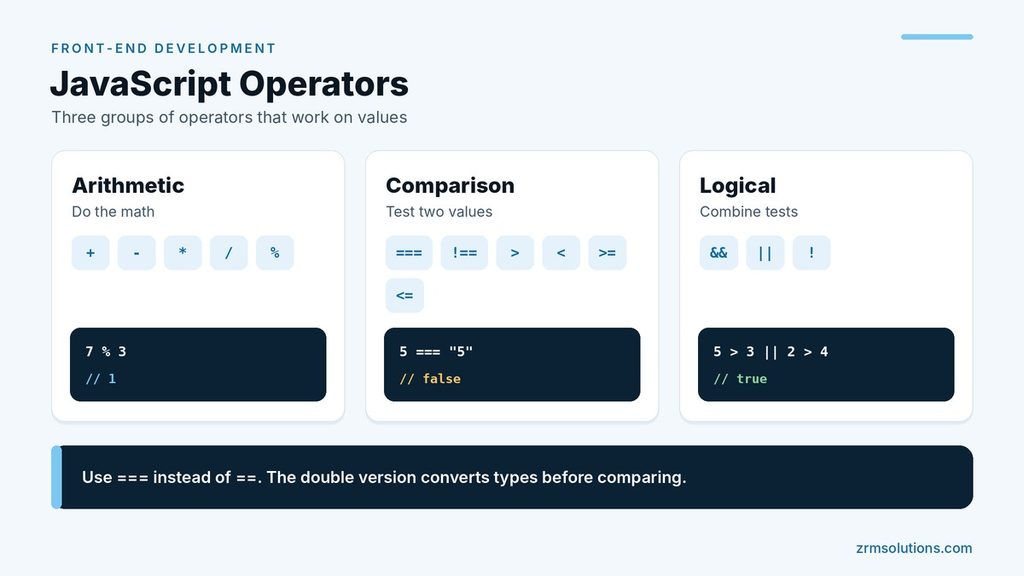
Operators work on values.
js
console.log(7 + 3);     // 10
console.log(7 % 3);     // 1 (the remainder)
console.log(5 === 5);   // true
console.log(5 === "5"); // false
console.log(5 > 3 && 2 > 4); // false
console.log(5 > 3 || 2 > 4); // true- Arithmetic:
+,-,*,/and% - Comparison:
===(equal),!==(not equal),>,<,>=and<= - Logical:
&&(and),||(or) and!(not)
Use === instead of ==. The double version converts types before comparing, so 5 == "5" is true, which causes surprises.
Conditionals and Loops
A conditional runs code only when a test is true.
const age = 20;

if (age >= 18) {
  console.log("Adult");
} else if (age >= 13) {
  console.log("Teenager");
} else {
  console.log("Child");
}
A loop repeats code. A for loop suits a known number of repeats. A while loop runs for as long as its condition stays true.
for (let i = 1; i <= 3; i++) {
  console.log("Round " + i);
}

let count = 3;
while (count > 0) {
  console.log(count);
  count--;
}
The first loop prints Round 1 to Round 3. The second prints 3, 2, 1. Make sure a loop’s condition eventually becomes false, or it will never stop.
Functions
A function is a reusable block of code. It can take inputs, called parameters, and send back a result with return.
function add(a, b) {
  return a + b;
}

const multiply = (a, b) => a * b;

console.log(add(2, 3));      // 5
console.log(multiply(2, 3)); // 6
The second form is an arrow function, a shorter way to write the same idea. Both are common, so learn to read both.
Arrays and Objects
An array is an ordered list. An object groups related values under names.
js
const colors = ["red", "green", "blue"];
console.log(colors[0]);     // red
console.log(colors.length); // 3
colors.push("yellow");

const user = { firstName: "Maya", age: 28 };
console.log(user.firstName); // Maya
user.age = 29;

for (const color of colors) {
  console.log(color);
}
Array positions start at 0, so the first item is colors[0]. The for...of loop visits each item in turn.
Notice that colors and user were changed even though they use const. const stops you from assigning a whole new value to the name. It does not freeze the contents.
Common Beginner Errors
- Using
=in a test. One equals sign assigns a value. Use===to compare. - Reassigning a
const. This gives “TypeError: Assignment to constant variable.” - Wrong spelling or capitals.
userNameandusernameare two different names. Using a name that does not exist gives a ReferenceError. - Missing brackets or quotes. This gives a SyntaxError, and nothing in the file runs.
- Adding a number to a string.
"5" + 1gives"51", not 6, because+joins strings. - Forgetting
return. A function without it gives backundefined. - Counting from 1. The last item of an array is at
length - 1.
When something fails, read the red message in the console. It names the error type and the line number.
Frequently Asked Questions
Is JavaScript the same as Java?
No. They are two separate languages with similar names. JavaScript runs in the browser, and Java is mostly used for other kinds of software.
Do I need to install anything to learn JavaScript?
No. A browser and a code editor are enough. The browser already contains everything needed to run JavaScript.
Should I use let, const or var?
Use const by default and let when a value must change. var is the older keyword. You will see it in old code, but it is best avoided in new code.
How long does it take to learn JavaScript basics?
With steady part-time study, most beginners become comfortable with JavaScript basics in two to three months. Short daily practice works better than one long session a week, because each idea builds on the one before it. Type every example yourself instead of copying it, then change a value and predict the result before you run it.
What should I learn after the basics?
Learn how JavaScript works with a web page. The next step is the DOM, the browser’s model of the page that lets your code read and change elements. After that come events, which let a page respond to clicks, key presses and form input. Both topics use the variables, functions and loops covered in this guide.
Final Thoughts
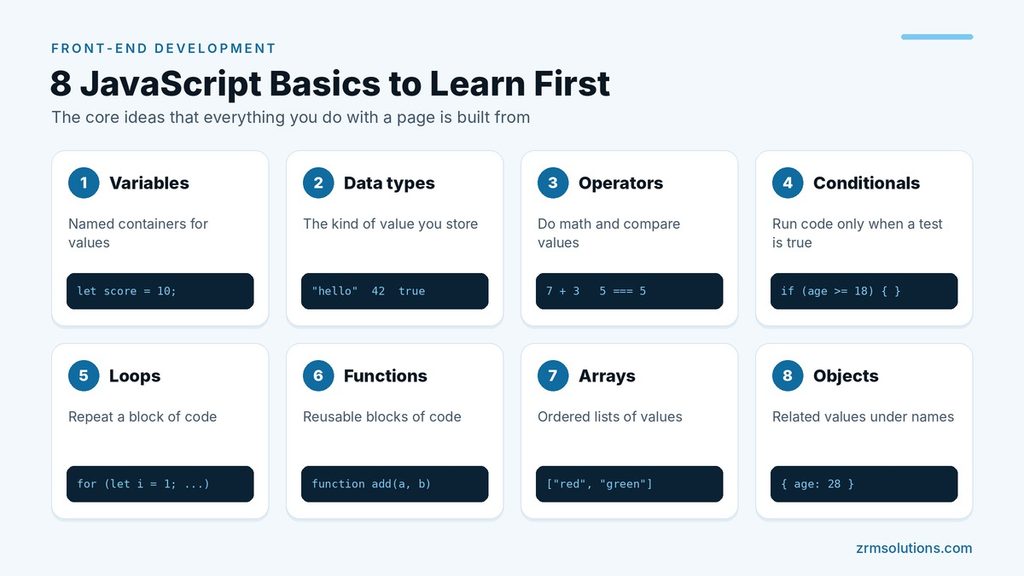
JavaScript basics are variables, data types, operators, conditionals, loops, functions, arrays and objects. Practice each one in the console until it feels familiar, because everything you do with a page later is built from these pieces.
Related reading
- Introduction to JavaScript DOM
- JavaScript Events and Event Handling
- How HTML, CSS and JavaScript Work Together