

How does a website work? It is a question almost every beginner asks, and the answer is simpler than it looks. Every time you open a page, your browser and a computer called a server have a quick conversation, and the page you see is the result of that chat.
In this guide, you will find the full answer to how does a website work, from the moment you type an address to the moment the page appears on your screen. We will cover the main parts, the seven steps of the journey, the difference between static and dynamic sites, and the basics of speed and security. No technical background is needed.
If you are also curious about the people who build websites, read our Introduction to Full-Stack Development after this article.
Table of Contents
How Does a Website Work? The Simple Answer
A website is a collection of files stored on a powerful computer called a server. That server is connected to the internet all day, every day. When you type a web address, your browser asks the server for those files. The server sends them back, and your browser puts them together into the page you see.
Think of ordering a parcel from an online shop. You write down the shop’s address, the delivery service carries your order, the shop packs your items and sends them back, and you open the box at home. In the same way, the browser sends a request, the internet carries it, the server prepares the files and the browser opens them.https://elementor.com/blog/what-is-a-website-guide/
So when someone asks how does a website work, the short answer is this: a browser asks, a server answers and the browser displays the answer.
The Main Parts Behind How a Website Works
Before we follow the full journey of how does a website work, let us meet the main parts. Every website, from a small blog to a huge store, uses most of these.
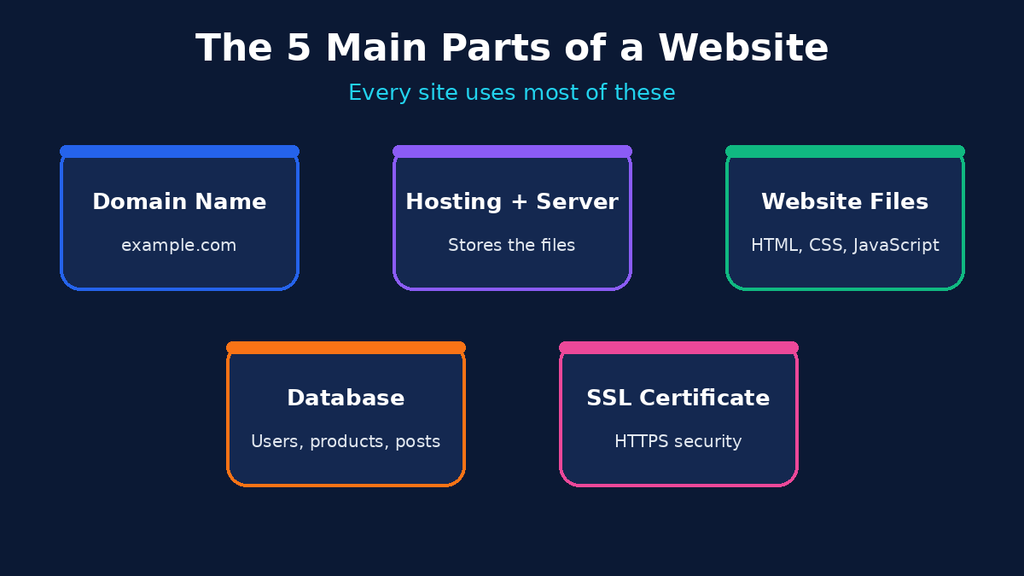
- Domain name: This is the human-friendly address, such as example.com. People find it easier to remember than a long number.
- Hosting and server: The server is the computer that stores your website files. Hosting is the service you pay for to keep that computer running and connected.
- Website files: These are HTML for structure, CSS for design and JavaScript for interaction. Images, videos and fonts are files too.
- Database: Many websites store data such as users, products and comments in a database that the server can read and update.
- SSL certificate: This is the security layer that turns
httpintohttpsand protects the data moving between you and the site.
Understanding these five parts makes the answer to how does a website work much easier to follow.
How Does a Website Work Step by Step? The 7-Step Journey
Here is the complete journey of one page load. It usually takes less than two seconds, but a lot happens in that time.
(Yahan Image 2 lagao: how-does-a-website-work-steps.png)
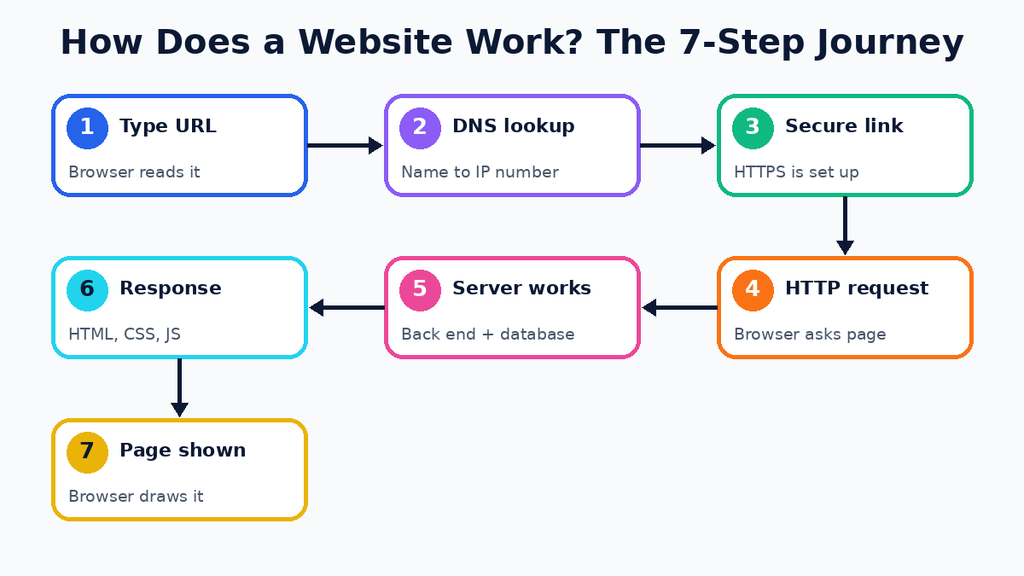
Step 1: You Type the Address
You type a web address, also called a URL, into your browser, or you click a link. The browser reads the URL to understand which website and which page you want.
Step 2: The Browser Looks Up the Domain (DNS)
Computers do not understand names like example.com. They use numbers called IP addresses. The browser asks a service called the Domain Name System (DNS) to translate the name into the correct IP address. You can think of DNS as the phone book of the internet.
Step 3: A Secure Connection Is Created
Once the browser knows the IP address, it connects to the server. If the site uses HTTPS, the two sides also agree on a secret code to protect the data. This is why you see a small lock icon near the address bar.
Step 4: The Browser Sends an HTTP Request
Now the browser sends a message, called an HTTP request, that says something like “please send me the home page”. You can read more about this language in the MDN guide to HTTP.
Step 5: The Server Prepares the Answer
The server receives the request and runs its back-end code. For a simple site, it just finds the right file. For a dynamic site, it may ask the database for information, check whether you are logged in and build a page made just for you.
Step 6: The Server Sends the Response
The server sends back an HTTP response. It contains a status code, such as 200 for success or 404 when the page cannot be found, plus the files needed for the page: HTML, CSS, JavaScript and images.
Step 7: The Browser Builds the Page
Your browser reads the HTML, applies the CSS and runs the JavaScript. Then it draws the page on your screen. The moment you see the finished page, the journey is complete.
Every time you click a link, submit a form or refresh a page, these steps start again. This loop is the real answer to how does a website work.
Static vs Dynamic Websites
Not all websites behave in the same way. How does a website work when the content is fixed, and how does it work when the content changes? The table below shows both.
| Feature | Static website | Dynamic website |
|---|---|---|
| Content | Same for every visitor | Can change for each visitor |
| Built with | HTML, CSS, JavaScript | Back-end language plus a database |
| Speed | Very fast | Slightly slower, but can be optimised |
| Examples | Portfolio, landing page | Online store, social network, blog with login |
| Updating | Edit the files by hand | Update content through an admin panel |
A static site is like a printed brochure: everyone gets the same copy. A dynamic site is like a personal assistant: it prepares something different depending on who is asking.
What Happens Inside Your Browser?
When people ask how does a website work, they often forget that the browser does a lot of work too. After it receives the files, it follows three main jobs:
- Parsing HTML: it reads the HTML and builds a map of the page, called the DOM.
- Applying CSS: it adds colours, fonts, spacing and layout.
- Running JavaScript: it makes the page interactive, for example by opening menus or checking a form before you submit it.
Browsers like Chrome, Firefox and Safari all do these same jobs, which is why a well-built website looks similar everywhere.
A Real-Life Example: Opening an Online Store Page
Let us see how does a website work with a real example. Imagine you open the page of a running shoe in an online store.
- Your browser asks the server for the product page.
- The server finds the shoe’s name, price and photos in the database.
- It checks whether the item is in stock and whether you are logged in, so it can show your saved address.
- It builds the page and sends it back.
- Your browser shows the shoe, the price and an “Add to cart” button.
When you click that button, a new request goes to the server, and the server updates your cart in the database. Each click is one more trip along the same seven-step journey.
How to See a Website Working in Your Own Browser
You can watch the journey yourself in under two minutes. Follow these steps:
- Open any website in Google Chrome.
- Press F12, or right-click the page and choose Inspect, to open the Chrome DevTools.
- Click the Network tab and refresh the page.
- Look at the list. Each row is a file the browser requested, such as HTML, CSS, images or scripts.
- Click one row to see its request, its response and its status code.
This small experiment answers how does a website work better than any diagram, because you see the real requests as they happen.
Key Terms Beginners Should Know
These words appear in almost every answer to how does a website work, so it helps to learn them early.
- URL: the full web address of a page.
- IP address: the number that identifies a server on the internet.
- DNS: the system that turns domain names into IP addresses.
- HTTP and HTTPS: the rules browsers and servers use to talk, with HTTPS being the secure version.
- Server: a computer that stores website files and answers requests.
- Browser: the app that requests, receives and displays web pages.
- API: a messenger that lets two programs exchange data.
Front End vs Back End: Who Does What?
To see how does a website work in practice, split it into two sides. The front end is everything that runs in your browser and that you can see and touch. The back end is everything that runs on the server and stays hidden. The front end asks, and the back end decides and answers.
Developers connect the two using APIs, which are the messengers between both sides. To go deeper, read our post on Front-End and Back-End Integration.
Why Some Websites Load Faster Than Others
Now that you know how does a website work, it is easy to see why some sites feel slow. Speed depends on a few things:
- Image size: large, uncompressed images take longer to travel.
- Server quality: cheap or overloaded hosting responds slowly.
- Distance: a server far from you needs more time to reply.
- Caching: browsers can save files so they do not download them again.
- CDN: a Content Delivery Network keeps copies of your files on servers around the world, so visitors get them from a nearby location.
Even small fixes, like compressing images, can make a big difference.
How Websites Stay Safe
Security is a big part of the answer to how does a website work, not an extra. Here are the basics:
- HTTPS encrypts the data between the browser and the server. Free certificates are available from Let’s Encrypt.
- Strong passwords and updates protect the admin area and fix known bugs.
- Input validation stops attackers from sending harmful data through forms.
- Backups let you restore the site if something goes wrong.
A website without these basics is like a shop with an unlocked door.
How Does a Website Work With WordPress?
WordPress is a good real-life example. It is built with PHP and uses a MySQL database. When a visitor opens a blog post, the server runs PHP, collects the post text from the database, mixes it with the theme design and sends the final HTML to the browser. The visitor sees a normal page, but behind the scenes the page was built in a fraction of a second. This shows how does a website work in the real world, and it is a perfect example of a dynamic website.
Frequently Asked Questions
How does a website work in simple words?
A browser asks a server for the files of a page, the server sends them back and the browser shows them on your screen. That is the whole idea.
Do I need hosting to have a website?
Yes. Hosting gives your website files a home on a server that is always connected to the internet, so visitors can reach them at any time.
What is the difference between a domain and hosting?
A domain is the address people type, while hosting is the place where your files live. You need both for a working website.
How does a website work without a database?
A static website needs no database. The server simply sends ready-made files. Databases are only needed when the content must change or be stored for each user.
Why does my browser show a 404 error?
A 404 error means the server could not find the page you asked for. The link may be wrong, or the page may have been moved or deleted.
Conclusion
So, how does a website work? A domain points to a server, the server stores the files and the browser requests, receives and displays them. Add a database and back-end code, and the website can become dynamic and personal. Once you understand this simple loop, every other web topic becomes easier to learn. Now that you know how does a website work, try opening your browser’s developer tools and watching the requests yourself.https://www.w3schools.com/howto/howto_website.asp