

JavaScript in full-stack development is the reason one person can build an entire web application without switching languages. The same language that makes a button respond in the browser can also run a server, handle logins and talk to a database. That single advantage is why JavaScript is the most popular starting point for new full-stack developers.
In this guide, you will learn what JavaScript does on the front end and the back end, which concepts you must master, how the main stacks work and seven easy steps to learn it properly. Every idea is explained with simple examples, so you can follow along even if you are a beginner.
If you are new here, read What Is Full-Stack Development? first, and then come back to this post.
Table of Contents
What Is JavaScript and Why Does It Matter?
JavaScript is a programming language that adds logic and behaviour to websites. HTML builds the structure of a page and CSS styles it, but JavaScript makes it respond. It checks forms, updates content without reloading and sends requests to servers.
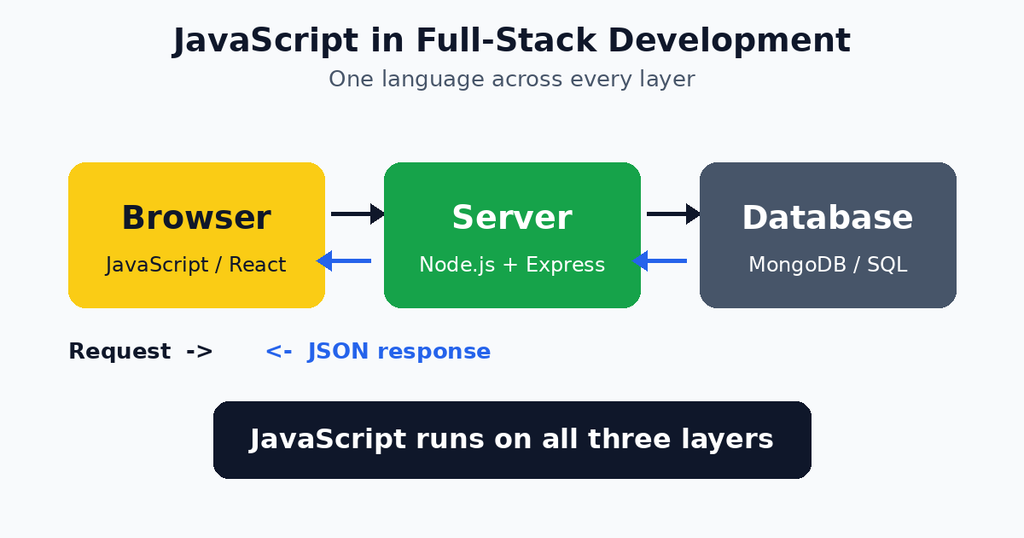
Originally, JavaScript only ran inside web browsers. In 2009, Node.js changed that by letting the language run on a server as well. Since then, JavaScript in full-stack development has meant one language for the whole project.
Think of a restaurant where one person can take orders, cook the food and manage the cash desk. There is no need to explain things to three different people, because that person understands the whole process. JavaScript gives a developer the same advantage across the browser, the server and the database.
Why JavaScript in Full-Stack Development Is So Popular
Many developers choose JavaScript in full-stack development for practical reasons:
- One language everywhere: you learn the syntax once and use it on both sides.
- Huge ecosystem: npm, the package manager, hosts more than two million free packages.
- Strong job market: companies of every size hire JavaScript developers.
- Faster learning: you can build a complete project sooner, because there is less to switch between.
- Shared code: validation rules and helper functions can be reused on the front end and the back end.
- Big community: almost every problem you meet already has an answer online.
Our guide to Essential Full-Stack Development Skills explains where JavaScript fits among the other skills you need.
JavaScript on the Front End
On the front end, JavaScript controls everything users interact with. These are the main areas to learn.
The DOM and Events
The Document Object Model (DOM) is the browser’s live map of your HTML page. JavaScript can read it, change it and react to events such as clicks, key presses and form submissions. The MDN JavaScript Guide is the best free place to practise this.
Fetching Data
Modern pages load data without refreshing. The built-in fetch function sends a request to the back end and gives you the response, usually in JSON format.
javascript
async function loadTasks() {
  const res = await fetch("/api/tasks");
  const tasks = await res.json();
  console.log(tasks);
}
Front-End Libraries and Frameworks
Once the basics feel comfortable, learn one library such as React, Vue or Svelte. They help you build reusable components and manage complex interfaces. Choose one and go deep, instead of sampling three.
JavaScript on the Back End
JavaScript in full-stack development works on the server through Node.js, a runtime that runs JavaScript outside the browser. Here is what the back end does with it.
Node.js and Express
Node.js handles incoming requests quickly, and Express is a light framework that adds routing and middleware. A basic route looks like this:
javascript
const express = require("express");
const app = express();
app.use(express.json());

app.get("/api/tasks", (req, res) => {
  res.json([{ id: 1, title: "Learn JavaScript" }]);
});

app.listen(3000);
This small server answers every request to /api/tasks with JSON. The front-end code above can call it directly, which shows how neatly both sides fit together. Our article on Front-End and Back-End Integration explains this connection step by step.
Authentication and Security
The back end also checks passwords, creates tokens and protects private data. JavaScript has well-known tools for this, such as bcrypt for hashing passwords and JSON Web Tokens for login sessions. Always keep secrets in environment variables, never inside your code.
JavaScript and Databases
A real application needs to store data, and JavaScript works with every major database.
- MongoDB: a document database that stores data in a JSON-like format. It feels natural to JavaScript developers, and Mongoose makes it easier to use.
- PostgreSQL and MySQL: relational databases that you can use through tools such as Prisma or Sequelize.
- Firebase and Supabase: hosted services that give you a database and authentication without much server setup.
Knowing basic SQL is useful even when you mostly use MongoDB, because many companies run relational databases.
Core JavaScript Concepts You Must Master
Before you jump into frameworks, make sure you are strong in these fundamentals:
- Variables and data types: use
letandconst, and understand strings, numbers, booleans, arrays and objects. - Functions and arrow functions: the building blocks of every program.
- Array methods:
map,filterandreduceappear in almost every project. - Asynchronous code: promises and
async/awaitlet you wait for servers without freezing the page. - Modules:
importandexportkeep large projects organised. - Error handling:
try/catchblocks stop one mistake from crashing the app. - JSON: the common format for sending data between the front end and the back end.
These concepts make JavaScript in full-stack development much easier, because frameworks are only a layer on top of them.
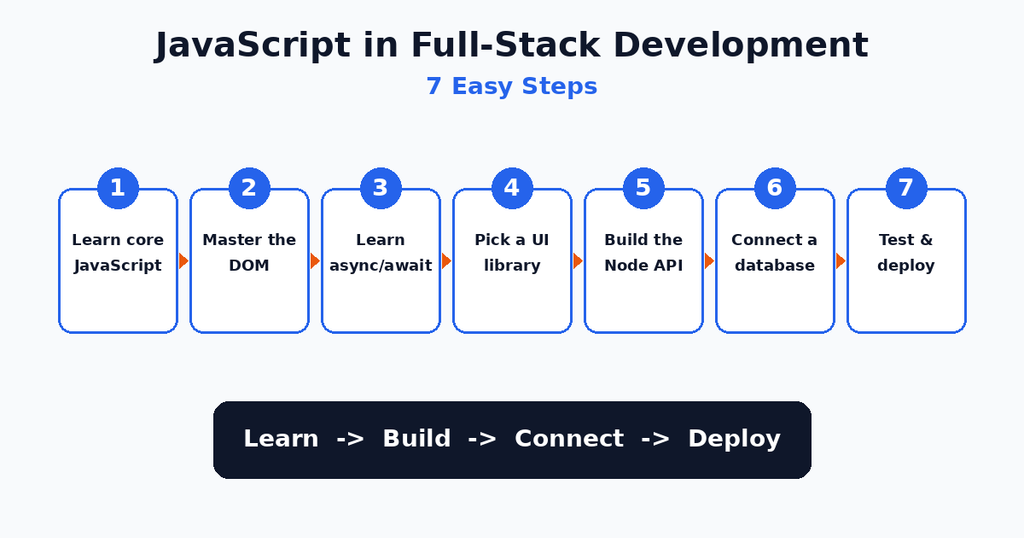
JavaScript in Full-Stack Development in 7 Easy Steps
Follow this order if you are starting from zero.
(Yahan Image 2 lagao: javascript-in-full-stack-development-steps.png)
- Learn core JavaScript. Study variables, functions, arrays, objects and loops. Practise on freeCodeCamp, which is free and hands-on.
- Master the DOM. Build small pages that react to clicks and form input.
- Learn asynchronous JavaScript. Understand promises and
async/await, then practise withfetch. - Pick a UI library. Learn React, Vue or Svelte and build a small app with reusable components.
- Build a Node.js API. Create routes with Express and test them with Postman.
- Connect a database. Store and read real data with MongoDB or PostgreSQL.
- Test and deploy. Write simple tests, then publish your project online. Our Full-Stack Development Workflow guide shows the full process.
Popular JavaScript Stacks
Once you know the basics, you will meet a few well-known combinations.
| Stack | Technologies | Best for |
|---|---|---|
| MERN | MongoDB, Express, React, Node.js | The most popular beginner path |
| MEAN | MongoDB, Express, Angular, Node.js | Large, structured applications |
| Next.js | React with built-in server features | Fast sites with good SEO |
| T3 / Prisma | TypeScript, Next.js, Prisma | Type-safe modern projects |
For your first project, the MERN stack is the best choice, because there are plenty of tutorials and a large community.
A Real-World Example: A Simple To-Do App
Imagine a to-do app. A user types a task and clicks “Add”. The front-end JavaScript reads the text and sends it to the server with fetch. The Node.js route checks that the text is not empty, saves it in MongoDB and returns the saved task. Then the front end adds the new task to the list on the screen.
Notice that the same language handled every step: reading the input, sending the request, validating the data, saving it and updating the page. That is JavaScript in full-stack development working as a single connected system.
Should You Learn TypeScript?
TypeScript is JavaScript with types added. It catches many mistakes before the code runs and makes large projects easier to maintain. Many companies now ask for it.
Learn plain JavaScript first. After you can build a small full-stack project, add TypeScript. The jump is easy, because almost everything you learned still applies.
Tools That Make JavaScript Easier
A few free tools will save you hours:
- VS Code: a free editor with helpful extensions such as ESLint and Prettier.
- Browser DevTools: the Console and Network tabs show errors and requests instantly.
- npm: installs packages and manages your project dependencies.
- Postman: tests your API before the front end exists.
- Git and GitHub: keep your code safe and show your work to employers.
Common Mistakes Beginners Make
Almost everyone makes these errors, so it helps to know them early.
- Jumping to frameworks too soon: weak fundamentals make React and Node feel confusing.
- Ignoring asynchronous code: forgetting
awaitis one of the most common bugs. - Trusting the front end alone: always validate data on the server too.
- Storing secrets in code: API keys belong in environment variables.
- Copying tutorials without understanding: change the code and break it on purpose to learn how it works.
- Not handling errors: every request can fail, so always plan for that.
Best Practices for Clean JavaScript
These habits keep your code readable as your project grows:
- Use
constby default andletonly when a value must change. - Give functions and variables clear names.
- Keep functions short and focused on one job.
- Split code into modules instead of one huge file.
- Use consistent formatting with Prettier.
- Write comments for tricky logic, not for obvious lines.
- Commit to Git often, with clear messages.
Practice Projects to Build Your Skills
Reading alone will not make you confident. Build these projects in order:
- Interactive quiz: practise the DOM and events.
- Weather app: practise
fetchand working with a public API. - To-do app with a Node.js API: practise the full front-end to back-end flow.
- Notes app with login: practise authentication and a database.
- Mini blog or store: combine everything into one portfolio project.
Put each project on GitHub with a clear README. Employers care much more about what you have built than about the courses you have finished.
Frequently Asked Questions
What is JavaScript in full-stack development?
It means using JavaScript for both the front end and the back end of an application. Node.js runs it on the server, and the browser runs it on the client side.
Is JavaScript enough to become a full-stack developer?
Yes, to get started. With JavaScript, HTML, CSS, a database and Git, you can build complete applications. Over time, you can add TypeScript and other tools.
How long does it take to learn JavaScript?
Most beginners learn the basics in six to eight weeks with daily practice. Becoming comfortable with Node.js and a framework usually takes four to six months.
Should I learn React or Node.js first?
Learn core JavaScript first, then React for the front end, and then Node.js for the back end. This order lets you see results quickly and keeps you motivated.
Is Node.js good for large applications?
Yes. Many large companies run Node.js in production. It handles many simultaneous connections well, especially for APIs and real-time features.
Do I need to learn another back-end language?
Not at the beginning. Many developers work with JavaScript only. Python, Java or PHP are useful later, depending on the jobs you want.
Conclusion
JavaScript in full-stack development gives you one language for the browser, the server and the data layer. Start with the core concepts, learn the DOM and asynchronous code, then add a UI library, a Node.js API and a database. Follow the seven steps, avoid the common mistakes and build real projects often. Keep practising JavaScript in full-stack development on every project, and you will soon be able to build complete applications on your own.