

HTML and CSS for full-stack development is where every project begins. Before a server can send data or a database can store it, someone has to build the page that people actually see and touch. HTML builds the structure of that page, and CSS makes it clean, organised and easy to use.
Many beginners rush toward React, Node.js and databases and treat HTML and CSS as a small warm-up. That is a costly mistake. Weak foundations lead to broken layouts, poor accessibility and messy code that every other layer has to work around. In this guide, you will learn what each language does, which skills a full-stack developer really needs and seven easy steps to practise them.
If you are new here, start with What Is Full-Stack Development? and How Does a Website Work?, then come back to this post.
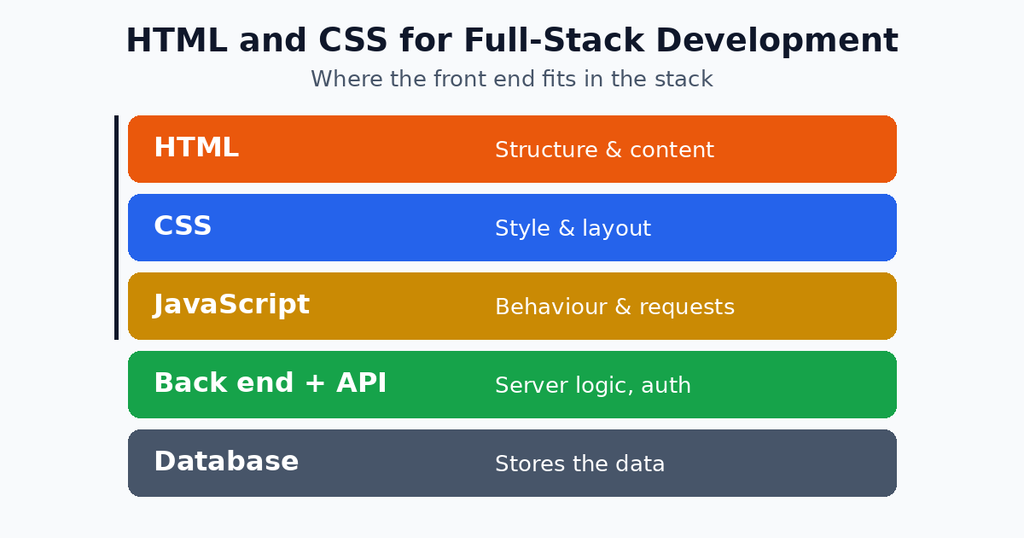
Table of Contents
What Are HTML and CSS?
HTML (HyperText Markup Language) describes the content and structure of a web page. It tells the browser what is a heading, what is a paragraph, what is a button and what is a form. CSS (Cascading Style Sheets) describes how that content looks, including colours, spacing, fonts and layout.
Think about building a house. HTML is the walls, doors and rooms. CSS is the paint, the lighting and the furniture arrangement. A house without paint still works, but nobody enjoys living in it. In the same way, a page without CSS works but feels unfinished.
Together with JavaScript, these two languages form the front end of every website. HTML and CSS for full-stack development is simply the first layer of the whole stack, and everything else sits on top of it.
Why HTML and CSS for Full-Stack Development Matters
A full-stack developer works on the browser, the server and the database. It is tempting to ignore the visual layer, but strong HTML and CSS for full-stack development gives you real advantages:
- Faster builds: you can create working screens without waiting for a designer.
- Better teamwork: you understand what front-end teammates need from the API.
- Cleaner integration: well-structured HTML makes JavaScript and back-end forms easier to connect.
- Accessibility: proper tags help screen readers and keyboard users.
- SEO: search engines read your HTML to understand the page, so good structure helps ranking.
- Interview confidence: many technical interviews start with a layout or form task.
Our guide to Essential Full-Stack Development Skills lists HTML and CSS first for exactly this reason.
Essential HTML Skills Every Full-Stack Developer Needs
HTML looks simple, but writing it well takes practice. Focus on these areas.
Semantic HTML
Semantic tags describe the meaning of content, not only its look. Use <header>, <nav>, <main>, <section>, <article> and <footer> instead of placing everything inside <div> tags. Semantic markup helps search engines, screen readers and other developers read your code.
Forms and Inputs
Forms are the main way users send data to a back end. Learn <form>, <input>, <select>, <textarea> and <button>, plus attributes such as required, type, name and placeholder. The name attribute matters a lot, because the server reads the data using those names.
Links, Images and Media
Learn how to use <a> for links, <img> with proper alt text, and <video> or <audio> for media. Always compress images, because large files slow the whole page.
Accessibility Basics
Add labels to inputs, use heading levels in order (H1, then H2, then H3) and make sure every button can be reached with a keyboard. These habits cost almost nothing and help every visitor.
Here is a small, well-structured example:
html
<main>
  <h1>Create Your Account</h1>
  <form action="/api/register" method="POST">
    <label for="email">Email</label>
    <input type="email" id="email" name="email" required>
    <label for="password">Password</label>
    <input type="password" id="password" name="password" required>
    <button type="submit">Sign Up</button>
  </form>
</main>
Essential CSS Skills Every Full-Stack Developer Needs
CSS controls the look of everything. These are the topics that matter most.
Selectors and Specificity
Selectors choose which elements to style. Learn element, class, ID and attribute selectors, and understand specificity, which decides which rule wins when two rules clash. Prefer classes over IDs, because they stay easy to reuse.
The Box Model
Every element is a box made of content, padding, border and margin. Once you understand the box model, spacing problems become easy to fix. Add box-sizing: border-box; to your project so widths behave the way you expect.
Flexbox
Flexbox arranges items in a row or column and aligns them neatly. It is perfect for navigation bars, cards and centring content. The CSS-Tricks Flexbox guide is a favourite reference.
CSS Grid
Grid handles two-dimensional layouts, such as a full page with a header, sidebar and content area. Use Flexbox for one-direction layouts and Grid for page-level structure.
Responsive Design
Most visitors use phones, so every page must adapt. Use a mobile-first approach, flexible units such as rem and %, and media queries to adjust the layout on larger screens.
CSS Variables and Transitions
Variables keep colours and sizes consistent across a project, while transitions add small, smooth animations. Both make a site look professional with very little code.
css
:root {
  --main-color: #2563eb;
}

.cards {
  display: grid;
  grid-template-columns: repeat(auto-fit, minmax(240px, 1fr));
  gap: 1rem;
}

.card {
  padding: 1rem;
  border-radius: 8px;
  border: 1px solid var(--main-color);
}
These few lines create a responsive card layout that works on both phones and desktops.
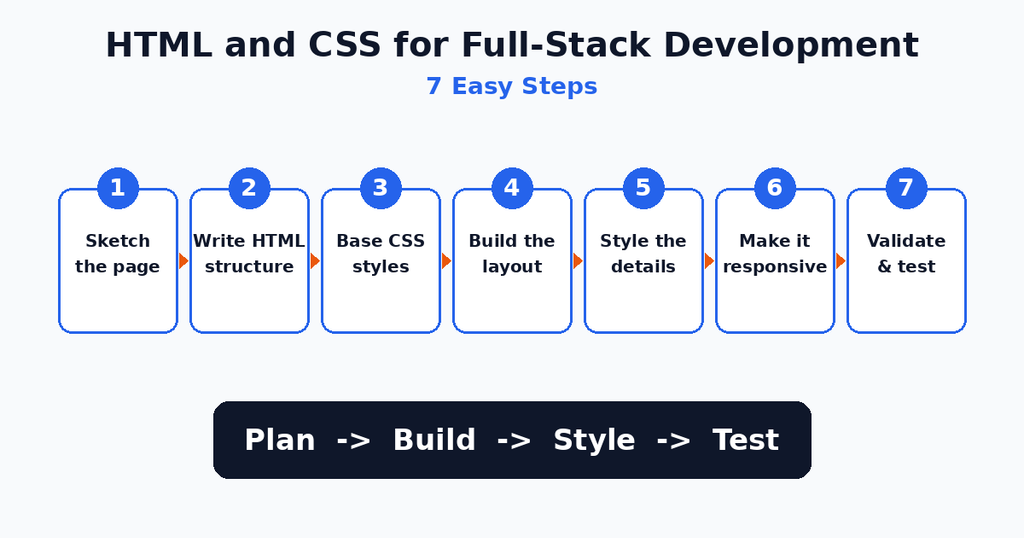
HTML and CSS for Full-Stack Development in 7 Easy Steps
Follow this order whenever you build a new page.
(Yahan Image 2 lagao: html-and-css-for-full-stack-development-steps.png)
- Sketch the page. Draw boxes on paper for the header, content and footer before writing code.
- Write the HTML structure. Use semantic tags and add headings, text, forms and links without any styling yet.
- Add a CSS reset and base styles. Set the font, colours,
box-sizingand basic spacing so the page has a consistent starting point. - Build the layout. Use Flexbox for rows and columns and Grid for the main page areas.
- Style the details. Add colours, buttons, hover effects and focus styles for forms.
- Make it responsive. Test at phone, tablet and desktop widths, and add media queries where the layout breaks.
- Validate and test. Check your HTML with the W3C Markup Validator and test the page in more than one browser.
For a free, structured course, the MDN Learn Web Development section covers every one of these steps.
HTML vs CSS vs JavaScript: Who Does What?
Beginners often mix up the three front-end languages. This table makes the roles clear.
| Language | Role | Example |
|---|---|---|
| HTML | Structure and content | A login form with two inputs |
| CSS | Style and layout | Blue button, centred card |
| JavaScript | Behaviour and logic | Check the form and send it to the server |
Good HTML and CSS for full-stack development means each language does only its own job. Do not use HTML for styling, and do not use JavaScript for something CSS can do.
How HTML and CSS Connect to the Back End
The visual layer is not separate from the server. It connects in three main ways:
- Forms: the
actionandmethodattributes send data straight to a back-end route, as in the example above. - JavaScript requests:
fetchcollects the values from your HTML inputs, sends them as JSON and updates the page with the response. Our post on Front-End and Back-End Integration explains this in detail. - Server-side templates: frameworks such as Django, Laravel and Express with EJS build HTML on the server and send the finished page to the browser.
In every case, clean HTML makes the connection easier. If an input has no name or id, the back end and JavaScript cannot find its value.
A Real-World Example: Building a Login Page
Imagine you are building a login screen for a web app. First, you write the HTML: a heading, two labelled inputs and a button, all inside a form. Next, you use CSS to centre the form in a card, add spacing, style the button and show a clear outline when an input is focused. Then you add a media query so the card fills the screen on small phones.
Finally, the form connects to the back end. A user types an email and password, the server checks them and the page either opens the dashboard or shows an error. The whole experience depends on solid HTML and CSS for full-stack development, because a confusing form or a broken mobile layout makes users leave before the back end even gets a chance.
CSS Frameworks: Should You Use Them?
Frameworks such as Bootstrap and Tailwind CSS give you ready-made styles. Bootstrap provides finished components like buttons and navbars, while Tailwind gives small utility classes that you combine yourself.
Frameworks save time on real projects, but learn plain CSS first. If you skip the basics, you will not understand what the framework is doing, and you will struggle every time something breaks. After you are comfortable with the box model, Flexbox and Grid, pick one framework and learn it well.
Tools That Make HTML and CSS Easier
A few free tools will speed up your practice of HTML and CSS for full-stack development:
- VS Code: a free editor with extensions such as Live Server and Prettier.
- Browser DevTools: inspect any element, edit CSS live and test different screen sizes.
- W3C Validator: find mistakes in your HTML.
- Can I use: check whether a CSS feature works in each browser.
- Figma: open design files and measure spacing.
- Git and GitHub: save your projects and show them to employers.
Common Mistakes to Avoid
Almost every beginner makes these errors. Knowing them saves hours.
- Using div for everything: semantic tags are better for SEO and accessibility.
- Skipping alt text: images without alt text hurt both accessibility and SEO.
- Using inline styles: they are hard to maintain. Keep CSS in a separate file.
- Ignoring mobile screens: test on a small width from the start.
- Fixed pixel widths: they break layouts on small devices. Use flexible units.
- Forgetting input names: the back end cannot read a field without a
name. - Overusing
!important: it creates specificity wars that are painful to fix.
Best Practices for Clean HTML and CSS
These habits keep your code easy to read as projects grow:
- Use clear, consistent class names, such as
card-titleandnav-link. - Keep one idea per CSS rule and group related rules together.
- Use CSS variables for colours, spacing and fonts.
- Write mobile-first CSS and add larger breakpoints later.
- Indent your HTML properly and close every tag.
- Test with the keyboard only, to catch accessibility issues early.
- Compress images and avoid unnecessary files to keep pages fast.
Practice Projects to Build Your Skills
Reading is not enough. Build these small projects in order:
- Personal portfolio page: practise semantic HTML, spacing and colours.
- Responsive landing page: use Flexbox, Grid and media queries.
- Contact form: add proper labels, validation attributes and clear styling.
- Restaurant menu page: practise cards, images and Grid layouts.
- Login and signup screens: connect them to a simple back end later.
Once these feel easy, move on to our Full-Stack Development Workflow guide to see how the finished front end fits into a complete project.
Frequently Asked Questions
What is HTML and CSS for full-stack development?
It is the foundation of the front end. HTML builds the structure of a page, CSS styles it, and a full-stack developer uses both to create screens that connect to a server and database.
Do full-stack developers need to be good at CSS?
Yes. You do not need to be a designer, but you should be able to build clean, responsive layouts without depending on someone else.
How long does it take to learn HTML and CSS?
Most beginners learn the basics in three to four weeks with daily practice. Becoming comfortable with layouts and responsive design usually takes two to three months.
Should I learn HTML and CSS before JavaScript?
Yes. JavaScript works on the elements that HTML creates, and CSS controls how they look. Learning them first makes JavaScript much easier to understand.
Is Bootstrap or Tailwind better for beginners?
Bootstrap is easier at the start because it gives ready-made components. Tailwind gives more control but needs good CSS knowledge. Learn plain CSS first either way.
Can I build a full website with only HTML and CSS?
You can build a static website, such as a portfolio or a landing page. For logins, databases and dynamic data, you also need JavaScript and a back end.
Conclusion
HTML and CSS for full-stack development is the base that every other skill depends on. Learn semantic HTML, forms, the box model, Flexbox, Grid and responsive design. Follow the seven steps, avoid the common mistakes and build small projects regularly. When your front end is clean and well structured, connecting it to a back end becomes far easier. Keep practising HTML and CSS for full-stack development on every project, and your confidence will grow quickly.