


How Does a Website Work? A website works through communication between your web browser, the internet, a web server, and databases. Whenever you open a website, several processes happen behind the scenes to display the information on your screen. These processes take place within seconds and allow users to browse pages, view images, watch videos, and interact with online services. https://www.w3schools.com/whatis/
Understanding how websites work is important for beginners who want to learn web development. In this guide, we will explain the complete website working process, from entering a website address to displaying the final webpage.
What Is a Website?
A website is a collection of related web pages available on the internet under a domain name. Websites can provide information, sell products, offer services, or allow users to communicate online.
For example, business websites, educational platforms, blogs, and online stores are all different types of websites.
Every website needs a few essential components to function properly, including a domain name, web hosting, website files, and an internet connection.
Understanding How Does a Website Work is essential for anyone interested in creating websites or learning web development. Every website uses different technologies that communicate with each other to deliver information to visitors.
If you are new to website development, read our complete guide on Introduction to Web Development to understand the fundamentals of creating websites.https://zrmsolutions.com/wp-admin/post.php?post=153&action=edit
How Does a Website Work Step by Step?
When you enter a website address into your browser, several steps happen to load the webpage.
1. You Enter a Website URL
The process starts when you type a website address, such as www.example.com, into your browser and press Enter.
Your browser uses this address to identify the website you want to visit.
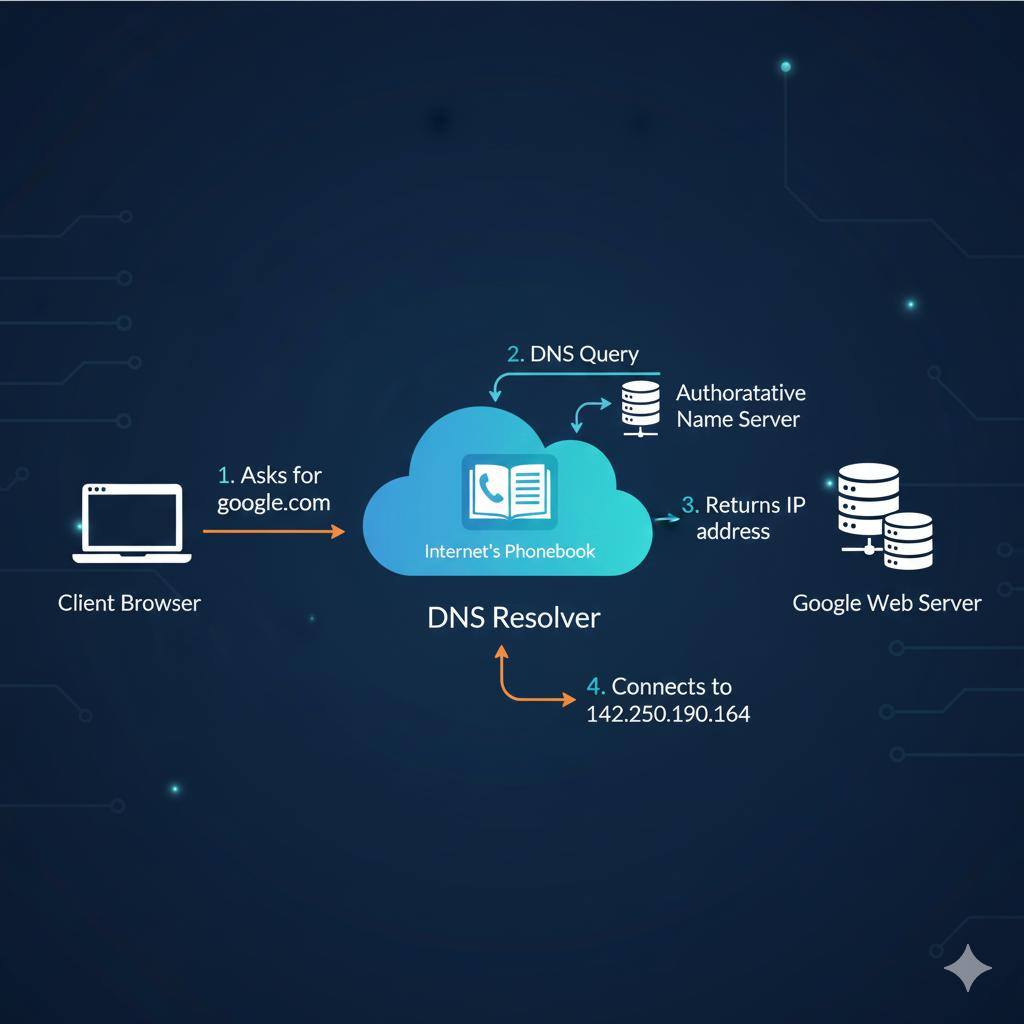
2. DNS Finds the IP Address
DNS stands for Domain Name System. It works like an internet phonebook by translating domain names into IP addresses.
Computers use IP addresses to identify servers and communicate with them. DNS helps your browser find the correct server for the requested website.
3. Your Browser Sends a Request
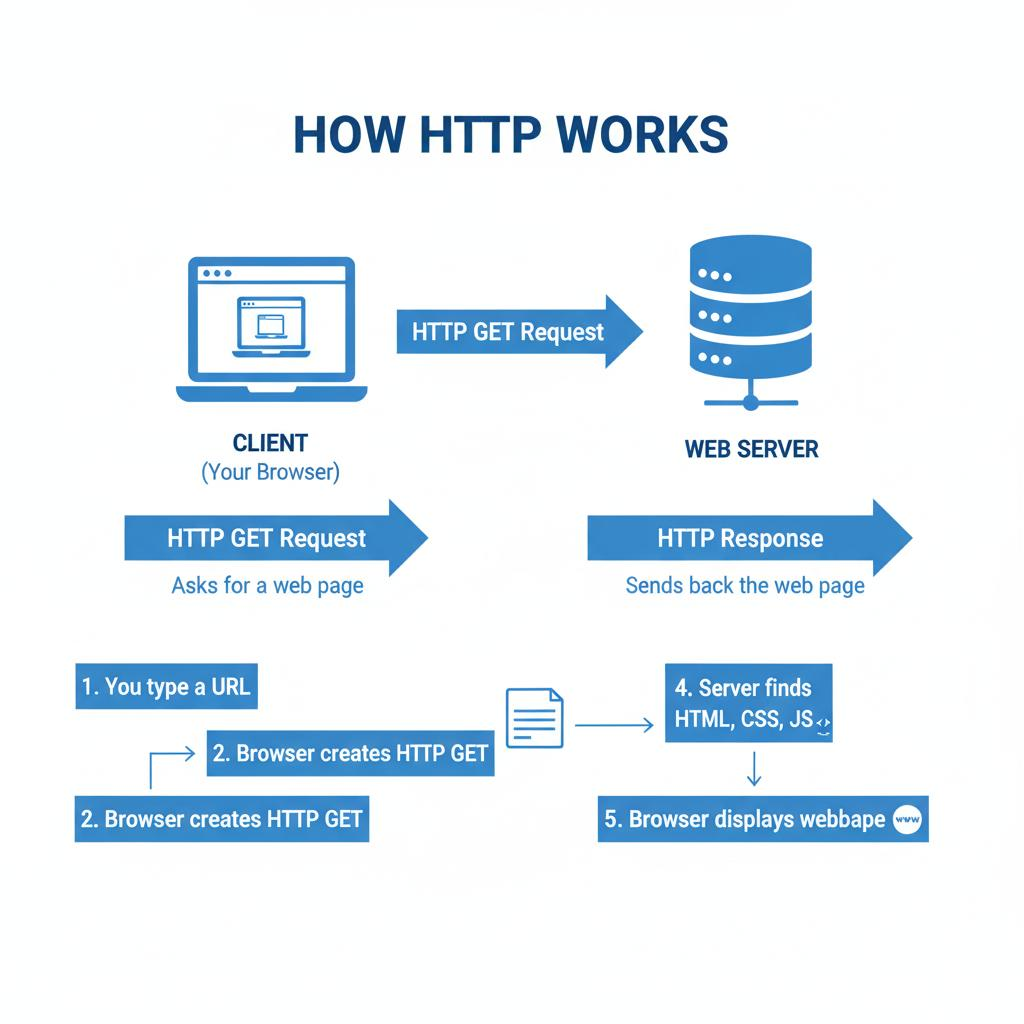
After finding the server’s IP address, your browser sends an HTTP or HTTPS request to that server.
This request tells the server which webpage or resource you want to access.
HTTPS also uses encryption to help protect information exchanged between the browser and server.
4. The Web Server Processes the Request
A web server receives the request and checks the website’s files and resources.
It processes the request and determines which information should be returned to the browser. Some websites also use server-side programming to generate content dynamically.
5. The Database Provides Information
Many websites use databases to store important information, such as user accounts, blog posts, product details, and customer records.
When necessary, the server communicates with the database to retrieve the requested information.
The database sends the relevant data back to the server for processing.
6. The Server Sends a Response
After processing the request, the server sends a response to the browser.
This response can include HTML, CSS, JavaScript, images, and other resources required to display the webpage.
The browser receives these files and begins preparing the page.
7. Your Browser Displays the Website
Finally, your browser reads the HTML, applies CSS styling, and executes JavaScript to display the webpage.
You can now see the website, click buttons, navigate between pages, and interact with its features.
Key Technologies That Make Websites Work
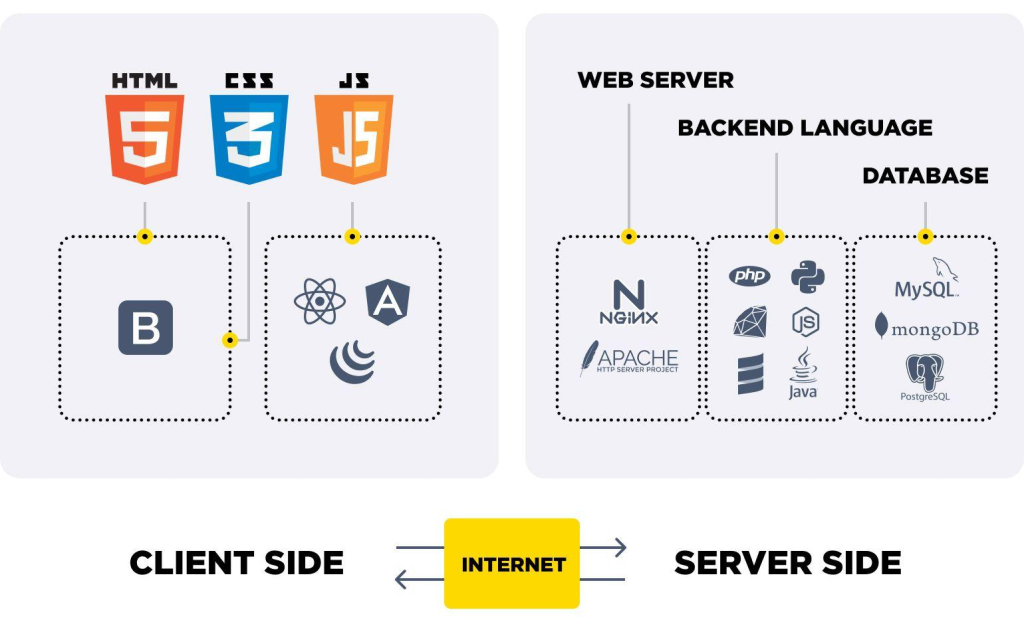
Different technologies work together to create functional and interactive websites.
HTML
HTML provides the basic structure of a webpage. It organizes content such as headings, paragraphs, images, and links.
CSS
CSS controls the appearance of a website. It manages colors, fonts, spacing, layouts, and responsive designs.
JavaScript
JavaScript adds interactive features to websites, such as dropdown menus, image sliders, animations, and dynamic content.
Web Servers
Web servers receive browser requests and deliver website files and other resources over the internet.
Databases
Databases store and organize website information so it can be retrieved whenever needed.
What Is the Difference Between a Browser and a Web Server?
A browser and a web server perform different roles in the website working process.
A web browser is an application that users use to access websites, such as Google Chrome, Mozilla Firefox, and Microsoft Edge.
A web server is a system that stores or processes website resources and responds to requests from browsers.
Both work together to make websites accessible over the internet.
Why Is It Important to Understand How Websites Work?
Learning How Does a Website Work helps beginners understand the connection between browsers, servers, databases, and the internet. This knowledge makes it easier to learn website development and build functional web applications.
Understanding how websites work provides a strong foundation for learning web development.
It helps beginners understand how front-end and back-end technologies communicate, how information is stored, and how websites deliver content to users.
This knowledge is also useful when learning programming languages, working with databases, creating WordPress websites, or developing web applications.
Conclusion
How Does a Website Work? It works through a series of steps involving browsers, DNS, internet connections, web servers, and databases. Each component performs a specific function to deliver the requested webpage to the user.
By understanding this process, beginners can develop a better understanding of web development and the technologies behind modern websites.
Whether you want to create a personal blog, a business website, or a professional web application, learning how websites work is an important first step.
Now that you understand How Does a Website Work, you can explore different web development technologies and start building your own website projects.