

Writing a style rule is only half the job. The other half is telling the browser which elements the rule applies to, and that is what CSS selectors do. A selector is the pattern at the start of a rule that picks out one element, a group of elements or a part of an element.
This guide walks through the selector types you will use most, then explains specificity, the system that decides which rule wins when two disagree.
Table of Contents
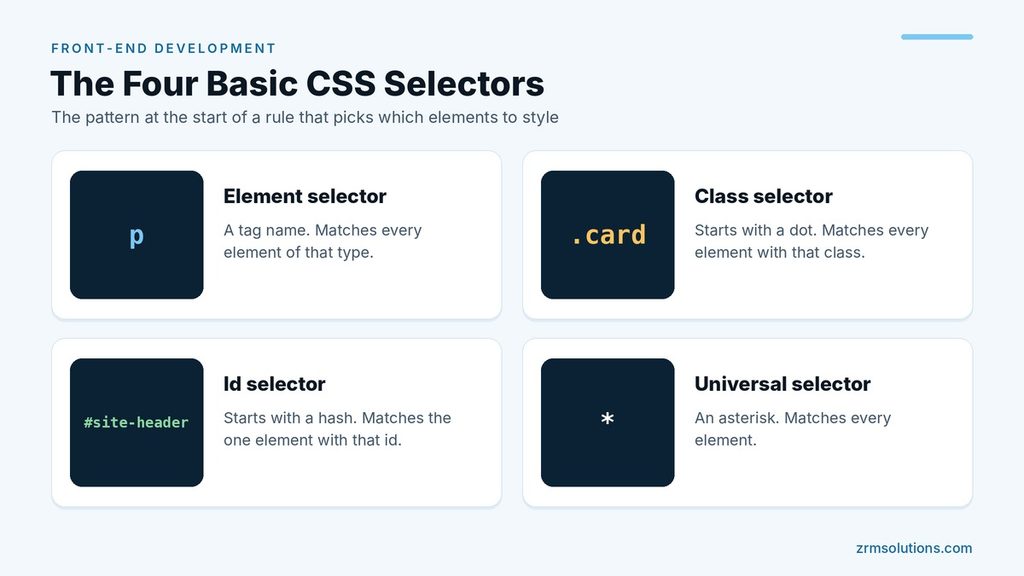
The Four Basic CSS Selectors
p { line-height: 1.6; }           /* element selector */
.card { padding: 16px; }          /* class selector */
#site-header { height: 80px; }    /* id selector */
* { margin: 0; } /* universal selector */- The element selector uses a tag name and matches every element of that type.
- The class selector starts with a dot and matches every element with that class.
- The id selector starts with a hash and matches the one element with that id.
- The universal selector is an asterisk and matches every element.
Grouping Selectors
When several selectors need the same styles, separate them with commas and write the rule once.
h1, h2, h3 {
  font-family: Georgia, serif;
}
You can also join selectors with no space to make a stricter match. For example, p.intro matches only paragraphs that have the class intro.
Combinators: Selecting by Relationship
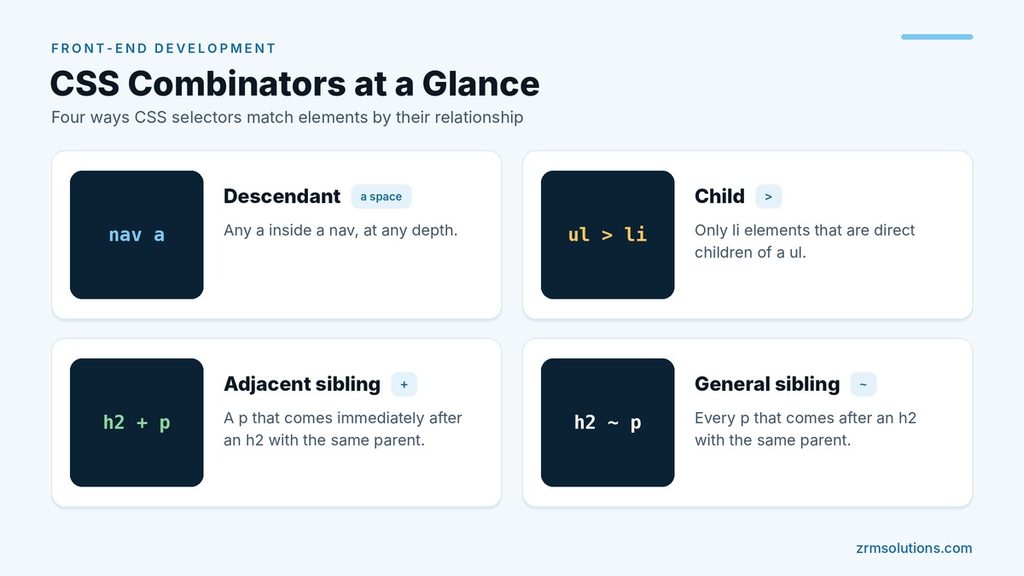
Combinators match elements based on where they sit in relation to other elements.
nav a { color: white; }       /* descendant */
ul > li { margin: 4px; }      /* child */
h2 + p { font-size: 18px; }   /* adjacent sibling */
h2 ~ p { color: #444444; } /* general sibling */- Descendant (a space): any
ainside anav, at any depth. - Child (
>): onlylielements that are direct children of aul. - Adjacent sibling (
+): apthat comes immediately after anh2with the same parent. - General sibling (
~): everypthat comes after anh2with the same parent.
Attribute Selectors
Square brackets select elements by their attributes.
img[alt] { border: 1px solid green; }
input[type="email"] { border-color: blue; }
a[href^="https"] { color: green; }
a[href$=".pdf"] { font-weight: bold; }
The first rule matches any image that has an alt attribute. The second matches an exact value. The symbols ^=, $= and *= match a value that starts with, ends with or contains the given text.
Pseudo-Classes
A pseudo-class selects an element in a particular state or position. It is written with one colon.
a:hover { text-decoration: underline; }
input:focus { border-color: blue; }
li:first-child { font-weight: bold; }
tr:nth-child(even) { background-color: #f2f2f2; }
.btn:not(.primary) { background-color: white; }:hoverapplies while the pointer is over the element.:focusapplies while the element is selected, for example a field you clicked or reached with the Tab key.:first-childmatches an element that is the first child of its parent.:nth-child()matches by position. It accepts a number,even,oddor a formula such as3n.:not()excludes whatever is inside the brackets.
Pseudo-Elements
A pseudo-element styles a part of an element, not the whole thing. It is written with two colons.
.note::before { content: "Note: "; font-weight: bold; }
.price::after { content: " USD"; }
p::first-line { text-transform: uppercase; }
::before and ::after insert generated content at the start or end of an element. They only appear when the content property is set. ::first-line styles the first line of a block of text, even when the line wraps differently.
How Specificity Decides the Winner
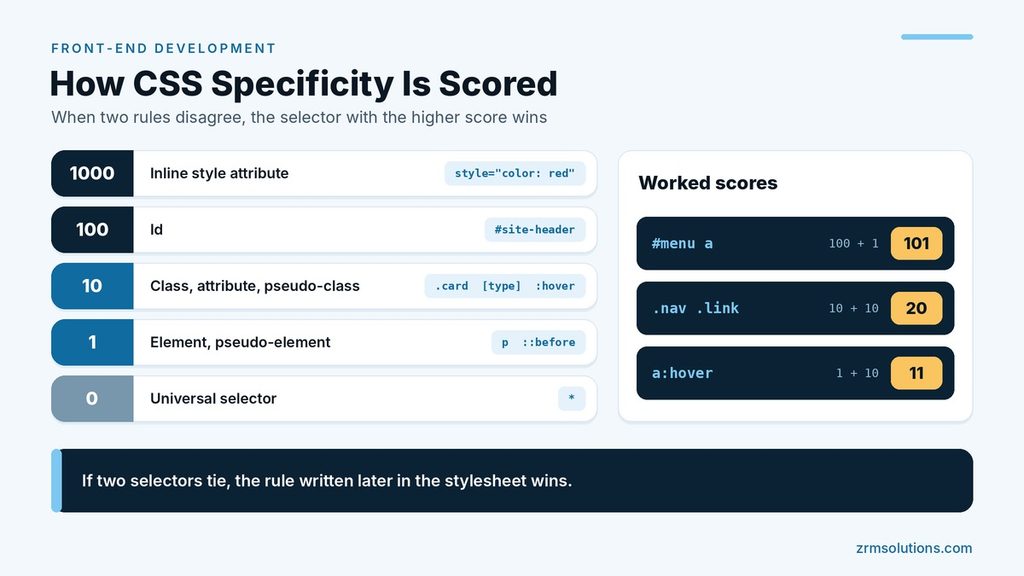
When two rules set the same property on the same element, the browser picks the one with the more specific selector. A simple way to compare them is to add up points.
| Selector part | Points | Examples |
|---|---|---|
Inline style attribute | 1000 | style="color: red" |
| Id | 100 | #site-header |
| Class, attribute, pseudo-class | 10 | .card, [type="email"], :hover |
| Element, pseudo-element | 1 | p, ::before |
| Universal selector | 0 | * |
A few worked scores:
#menu ascores 100 + 1 = 101.nav .linkscores 10 + 10 = 20a:hoverscores 1 + 10 = 11
The highest score wins. If two selectors tie, the rule written later in the stylesheet wins.
Two notes keep this accurate. First, the points are a memory aid. The browser really compares the columns from left to right, so no number of classes can outrank a single id. Second, :not() adds nothing itself, but the selector inside it does count.
Tips for Writing Better Selectors
- Prefer classes. They are reusable, they describe purpose and their low specificity makes them easy to override.
- Avoid over-qualifying.
div.cardandul li a.nav-linkare longer than needed..cardand.nav-linkdo the same job. - Go easy on ids. An id selector is so strong that overriding it later means writing an even stronger selector.
- Avoid
!important. It forces a declaration to beat normal rules whatever their specificity, and the only way to beat it is another!important. Treat it as a last resort. - Keep selectors short. Long chains break as soon as the HTML structure changes.
How the Browser Reads a Selector
It helps to know that a browser reads a selector from right to left. Take this rule:
nav ul a { color: white; }The browser first finds every a element on the page. For each one, it then checks whether there is a ul somewhere above it, and a nav above that. The last part of the selector, here the a, is the element that actually receives the styles. Everything to its left is only a condition.
This gives you a simple way to read any of the CSS selectors you meet in other people’s code: look at the right-hand end first to see what is being styled, then read leftward to see when.
More Pseudo-Classes Worth Knowing
The earlier list covers the pseudo-classes you will use daily. A few more appear often enough to learn early.
li:last-child { border-bottom: none; }
p:nth-of-type(2) { font-weight: bold; }
input:checked + label { color: green; }
button:disabled { opacity: 0.5; }
a:focus-visible { outline: 2px solid blue; }- :last-child matches an element that is the last child of its parent.
- :nth-of-type() counts only siblings of the same element type.
- :checked matches a ticked checkbox or a selected radio button.
- :disabled matches a form control that cannot be used.
- :focus-visible matches a focused element when the browser decides a focus ring is needed, which is mainly during keyboard navigation.
The difference between :nth-child and :nth-of-type causes regular confusion. Suppose a section contains a heading followed by three paragraphs. p:nth-child(2) matches the first paragraph, because it is the second child of the section. p:nth-of-type(2) matches the second paragraph, because it only counts paragraphs.
Links have their own set: :link for unvisited links, :visited, :hover and :active. When you style all four, write them in that order. Each one has the same specificity, so a later rule overrides an earlier one, and this order keeps the hover and active styles working.
More Pseudo-Elements
Three more pseudo-elements are easy to use and handy on real pages.
input::placeholder { color: #888888; }
::selection { background-color: #ffe08a; }
li::marker { color: #1a73e8; }- ::placeholder styles the hint text inside an empty form field.
- ::selection styles the text a visitor highlights with the mouse.
- ::marker styles the bullet or number of a list item.
Each of these accepts only a limited set of properties. ::marker, for example, allows color and font settings but not padding or a background. If a declaration seems to be ignored on a pseudo-element, that limit is usually the reason.
Grouping with :is(), :where() and :has()
Three newer pseudo-classes make long selectors shorter and solve problems that used to need extra classes.
:is(h1, h2, h3) a { text-decoration: none; }
:where(ul, ol) { padding-left: 20px; }
.card:has(img) { padding: 0; }
:is() takes a list and matches any item in it. The first rule is the same as writing h1 a, h2 a, h3 a. Its specificity is that of the most specific item in the list.
:where() works the same way, but it always adds zero specificity. That makes it ideal for default styles, because any later rule can override them without a fight.
:has() selects an element based on what it contains. The third rule matches only the cards that have an image inside them. For many years CSS could not select a parent from its child, and :has() fills that gap. It is supported in the current versions of all major browsers.
Attribute Selectors in Real Projects
Attribute selectors are useful whenever the HTML already says what you need, so you do not have to add a class.
a[target="_blank"] { padding-right: 16px; }
input[type="checkbox"] { width: 20px; }
[lang="fr"] { font-style: italic; }
[data-state="open"] { display: block; }
a[href$=".pdf" i] { font-weight: bold; }
The fourth rule shows a common pattern. JavaScript changes a data attribute on an element, and CSS reacts to the new value. The script never has to touch the styles directly.
The i before the closing bracket in the last rule makes the match ignore upper and lower case, so the rule also matches a link that ends in .PDF.
The Cascade: Where Specificity Fits In
Specificity is one step in a longer decision process called the cascade. When several declarations set the same property on the same element, the browser settles it in this order:
- Declarations marked !important win over normal ones.
- Inline styles, written in the style attribute, win over rules in a stylesheet.
- The selector with the higher specificity wins.
- If everything is still equal, the rule that comes last wins.
Most everyday conflicts are decided at step 3 or step 4, which is why specificity and source order deserve the most attention.
Inheritance is a separate idea that is often mixed up with the cascade. Some properties, such as color, font-family and line-height, pass from a parent to its children. Others, such as margin, padding and border, do not. An inherited value is the weakest of all. Any rule that targets the element directly beats it, even a rule that uses the universal selector.
More Worked Specificity Scores
Practice with a few longer CSS selectors makes the scoring automatic.
- ul li a scores 1 + 1 + 1 = 3
- a[href^=”https”] scores 1 + 10 = 11
- .menu a:hover scores 10 + 1 + 10 = 21
- #nav .menu a scores 100 + 10 + 1 = 111
- :is(#main, .content) p scores 100 + 1 = 101, because :is() takes the highest score in its list
- :where(.content) p scores 0 + 1 = 1, because :where() adds nothing
Combinators such as the space, the child arrow and the plus sign add no points. Only the parts they connect are counted.
Naming Classes So Selectors Stay Simple
Good class selectors start with good class names. A few habits keep them readable:
- Name the purpose, not the look. .btn-primary still makes sense after a redesign. .blue-button does not.
- Use lowercase words joined by hyphens. Class names are case sensitive, so .Card and .card are two different classes.
- Do not start a name with a digit. A class such as 2col cannot be written as a normal selector.
- Give each component one main class. Add a second class for a variation, such as card and card-featured, instead of writing a longer selector.
Many teams follow a naming convention called BEM, which writes names in the pattern block__element–modifier. You do not need it to begin with, but you will meet it in existing projects.
Common Mistakes with CSS Selectors
A space that changes the meaning. p.intro matches a paragraph with the class intro. p .intro matches any element with that class inside a paragraph.
A missing dot or hash. card { } looks for an element called card, which does not exist. The class version is .card.
A comma that drops the first part. .card h2, p styles every paragraph on the page, not only those inside a card. Each item in a list is a complete selector, so write .card h2, .card p.
Capitals that do not match. class=”Menu” in the HTML is not matched by .menu in the CSS.
The same id used twice. The styles may still apply, but links to that id and scripts that look for it will find only the first one.
Raising specificity to win. Adding ids or !important fixes today’s conflict and creates tomorrow’s. Lower the other selector instead.
Testing a Selector in the Browser
You can check what a selector matches without editing any file.
Open the developer tools and press Ctrl + F (Cmd + F on a Mac) inside the HTML panel. The search box accepts selectors, so typing .card a steps through every matching element.
The console gives you a count. Type the line below and the browser returns the number of matches:
document.querySelectorAll(".card a").lengthWhen a rule seems to be ignored, select the element and read the styles list. A declaration that lost to a stronger rule is shown crossed out, with the winning rule above it.
CSS Selectors Cheat Sheet
- Every element of a type: p
- Every element with a class: .card
- One element with an id: #site-header
- An element with two classes: .btn.primary
- Any link inside a nav: nav a
- Direct children only: ul > li
- The next sibling: h2 + p
- By attribute value: input[type=”email”]
- On hover: a:hover
- Every second row: tr:nth-child(even)
- Everything except one class: .btn:not(.primary)
- A parent that contains something: .card:has(img)
Frequently Asked Questions
What is the difference between a pseudo-class and a pseudo-element?
A pseudo-class selects a whole element in a certain state or position, such as :hover. A pseudo-element selects a part of an element or generated content, such as ::first-line or ::before.
Which CSS selectors should beginners use most?
Class selectors. They work on any element, can be reused across a page and keep specificity low, which prevents most override problems.
Why is my CSS rule not being applied?
The usual causes are a typo in the selector, a class name that does not match the HTML or another rule with higher specificity. The browser’s developer tools show which rule won.
Final Thoughts
CSS selectors are how you point at the exact element you want to style, and specificity is how the browser settles conflicts between rules. Build most of your styles on simple class selectors, and the rest of your CSS will stay predictable.
Related reading
- CSS Basics for Front-End Development
- Understanding the CSS Box Model
- Understanding HTML Attributes
Can CSS select a parent element?
Yes, with :has(). For example, .card:has(img) matches a card that contains an image, and form:has(input:invalid) matches a form with an invalid field. Before :has() arrived, this needed an extra class or JavaScript.
Are CSS selectors case sensitive?
Partly. Element names in HTML are not, so P and p match the same elements. Class names and ids are case sensitive, and attribute values usually are too, unless you add the i flag.
How many classes can one element have?
As many as you need, separated by spaces in the class attribute. To match an element that has two particular classes at once, join them with no space, as in .btn.primary.
Do long selectors make a page slower?
In practice, almost never. Modern browsers match selectors very quickly. The real reasons to keep selectors short are that they are easier to read, easier to override and less likely to break when the HTML changes.